During the install, the user is prompted with options which software components to install, by default, all necessary components are selected which are needed to run a POS with its service located on the same machine.
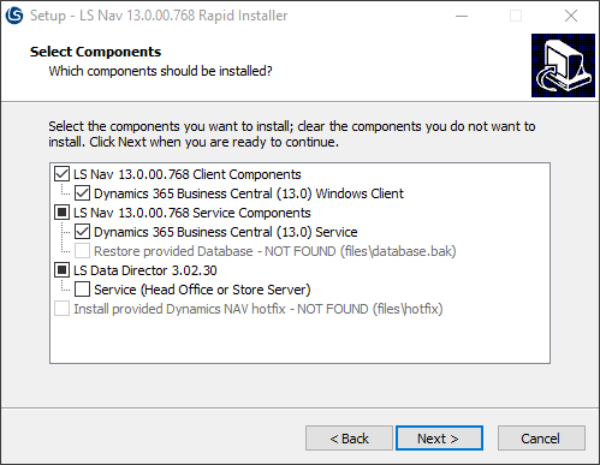
Due to the three tier architecture of Business Central, there are two possible ways to set up a POS:
- POS with a service tier on the same computer
- Select service, client and data director
- POS with shared service tier, service tier on a different computer
- Only select client
For best performance, run the POS with the service tier on the same computer. Using a shared service tier can simplify other processes, such as replication and setup. Also, having a failover POS setup can increase robustness of the system, for further information on failover POS setup, see user guide for LS Central Start.
The installer can also be utilized to set up head office:
- Head Office installation
- Select client, service, data director and data director service
When the service components are selected, a new MSSQL Express database instance is created named LSCentral if it does not already exist and if a database is to be restored, it will also be named LSCentral.